
How to Manage a Pet Grooming Salon
What changed: Corrected how WhatsApp messages are sent: petboard does not send them for you. It opens WhatsApp with the message ready, and you press send.
On this page (12 sections)
In short: to manage a grooming salon, put every appointment on one calendar with a lane for each groomer, and give each booking its real length (a full groom is not a nail trim). Keep care notes on the pet, send photo updates from your own WhatsApp number, and close each visit with a bill and a UPI pay link. At the end of the day, check three things: what was done, what was paid, and what is still owed.
Managing a grooming salon is less about having one perfect calendar and more about keeping several moving parts aligned. Each appointment has a duration, a service, a groomer, a pet and a customer. Then there are walk-ins, reschedules, packages, payment questions and notes that only matter for one particular animal.
The easiest way to make the operation more manageable is to decide what information needs to live in one place and then build the daily workflow around it. That does not mean making the business complicated. It means reducing the number of things someone has to remember.
This guide is about running the day. If you are still choosing a system, read 15 pet grooming software features to look for first.
Start with a service menu that reflects how you actually price
A salon rarely has a single grooming price. Service, pet size, coat, duration and add-ons can all affect the final amount. Your booking system should reflect those choices rather than forcing the team to choose a generic service and adjust the price later.
A structured service menu also helps the calendar make sense. If a full groom takes longer than a nail trim, the booking duration should reflect that difference.
Make the staff calendar the operating view
Once there are multiple groomers, the salon needs to see the day from the team's point of view. Who has the next appointment? Which slots are free? Can a walk-in fit? Is someone already running late?
A calendar with separate staff lanes is useful because the operator can see the capacity of the whole salon without opening each booking one at a time.
In petboard, each groomer has a lane. If two bookings in one lane overlap, the lane shows an "overlapping" label, so a double booking is visible before the pet arrives.
Keep pet notes with the pet
Grooming notes often become more important after the first visit. An allergy, a sensitive area, a preferred handling method or a note about the last service can affect the next appointment.
Those details should live on the pet profile so the next groomer does not depend on the previous groomer's memory or an old message from the parent.
Give customers a clear way to communicate
Parents want confirmation, updates and receipts, but most do not want to learn a complicated customer portal just to book a groom. Many salons already use WhatsApp. A good operating system should fit that reality rather than force communication into a completely separate workflow.
petboard lets you share photo updates from your own WhatsApp number, and parents open their booking links in a browser, so there is no app for them to download.
Handle walk-ins without disrupting the rest of the day
A walk-in is not unusual in grooming. The problem comes when adding that one appointment means manually moving three other bookings. A useful calendar should show where the next suitable opening is and make the new visit part of the same schedule.
Use packages for repeat business, not a second spreadsheet
If you sell a 10-visit grooming package or a seasonal membership, the software should keep track of the balance. The customer should be able to see what remains, and the salon should not need to remember which sheet contains the package ledger.
Close every booking with the bill
The final step of the appointment should be straightforward: confirm the service, apply any package or discount, record the payment and produce the correct invoice. In India, GST-registered salons should also check whether the system handles the required tax details.
How do Indian salons take payment and send updates?
Three things are different for a salon in India.
1. Put a UPI link on the bill. Many parents pay by UPI. In petboard, you save your UPI ID once in Settings. Bills sent on WhatsApp then carry a tap-to-pay link with the amount due filled in, and the money goes from the parent's UPI app to your UPI ID. Type the ID carefully.
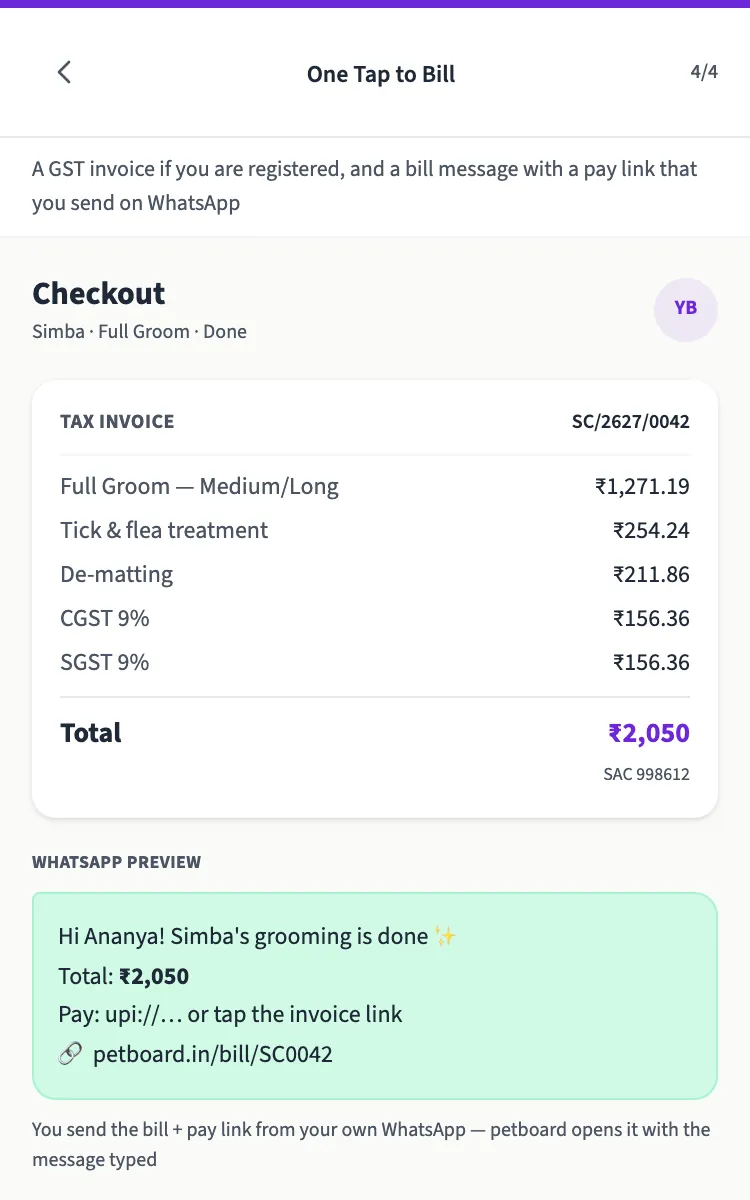 From petboard's demo account: the bill for a GST-registered salon, and the WhatsApp message with a UPI pay link. Without a GSTIN, the bill has no tax lines.
2. Send updates from your own WhatsApp number. Parents already have your number saved, and they reply to you in the same chat. In petboard, you tap a button and WhatsApp opens with the message already written. You check it and press send. petboard does not send WhatsApp messages for you.
3. Charge GST only if you are registered. Grooming is a service. Under section 22 of the CGST Act (CBIC, checked 18 October 2026), a supplier must register for GST when aggregate turnover in a financial year exceeds Rs 20 lakh. The limit is Rs 10 lakh in Manipur, Mizoram, Nagaland and Tripura. The Rs 40 lakh limit in Notification 10/2019-Central Tax (checked 18 October 2026) is only for people who supply goods and nothing else, so it does not cover a grooming salon. If you are not registered, do not add GST to your bill. In petboard, a bill becomes a GST tax invoice only after you add a regular-scheme GSTIN in Settings. Without a GSTIN, petboard gives a simple bill with no tax line.
Example: what one two-groomer day looks like
This example uses made-up numbers, not market rates.
The salon is open from 10 am to 7 pm. That is 540 minutes for each groomer. The menu has three services: a full groom (120 minutes, Rs 1,800), a bath and blow-dry (60 minutes, Rs 800) and a nail trim (15 minutes, Rs 250).
| Groomer 1 | Groomer 2 | |
|---|---|---|
| Bookings | 3 full grooms, 2 baths | 1 full groom, 4 baths, 4 nail trims |
| Minutes booked | 480 of 540 | 420 of 540 |
| Free time | 60 minutes | 120 minutes |
| Value of the work | Rs 7,000 | Rs 6,000 |
At 3 pm, a walk-in asks for a nail trim. Groomer 2 has 9 bookings and Groomer 1 has 5, so Groomer 2 looks full. But in minutes, Groomer 2 has the most free time. The nail trim goes into Groomer 2's lane.
At closing:
- Work done: Rs 7,000 + Rs 6,000 + Rs 250 = Rs 13,250.
- One bath was a visit from a 10-visit package paid last month. It brings no new money, and the package goes from 6 visits left to 5. New money due: Rs 13,250 − Rs 800 = Rs 12,450.
- One parent will pay a Rs 1,800 full groom later by the UPI link. Collected today: Rs 10,650. Still owed: Rs 1,800.
Counting bookings would have hidden the free time, counted the package visit as new money, and missed the unpaid bill.
In petboard, the top of each groomer's lane shows how many appointments that groomer has and what they are worth. One line above the calendar shows the whole day: appointments, hours booked, money billed and money still expected. Add a walk-in from the calendar and petboard suggests the next free slot in the groomer's lane.
Review the day using a few practical numbers
A salon does not need a finance dashboard with dozens of charts. Start with the things the owner actually needs: appointments completed, revenue, payments outstanding, revenue by groomer and package balances.
Over time, those numbers can help answer whether the salon needs another groomer, whether certain services are underused or whether a schedule is consistently running at capacity.
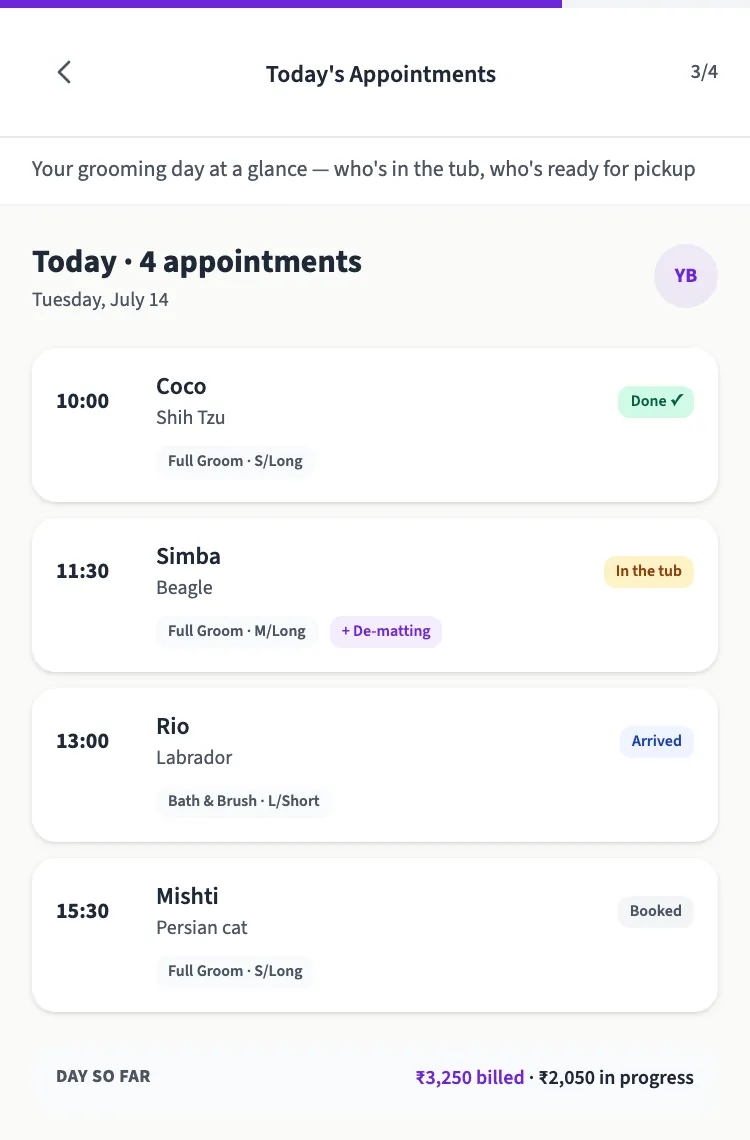 From petboard's demo account: today's appointments with their status, and the money billed and still in progress.
What should a salon check every day?
Use this list at the front desk.
| When | What to check | Why it matters |
|---|---|---|
| Before opening | Today's lanes. Any overlaps. Care notes and allergies for each pet booked. | A clash or an allergy is easier to fix before the pet arrives. |
| At check-in | The service, the pet's size and coat, and the parent's phone number. | Size and coat set the price. The phone gets the bill and photos. |
| During the groom | A before photo and an after photo, sent from your own WhatsApp. | Parents see the result. |
| At checkout | Package balance used, discount, the bill and the UPI pay link. | The parent can pay in one tap. |
| At closing | Unpaid bills. Notes for the pet's next visit. Tomorrow's first bookings. | Money owed is followed up. The next groomer has the notes. |
What good salon software feels like
A useful system should make the day feel more predictable. The front desk can see what's happening next, the groomer can open the pet record, the parent can receive an update, and the owner can see what was completed and paid for. None of those tasks should require copying information into another system.
petboard's pet grooming software covers time slots for each groomer, prices by pet size and coat, a calendar lane for each groomer, care notes such as allergies on the pet record, photo updates from your own WhatsApp number, prepaid grooming packages, bills with a UPI pay link (GST invoices if you add your GSTIN) and each pet's booking history. Plans and prices are on the founder pricing page.
More resources:
- Complete Guide to Pet Service Ops in India (all service types in one place)
- WhatsApp for Pet Boarding: A Setup Guide (parent updates without an app)