
Move Your Pet Client List From Excel to Software
On this page (9 sections)
In short
Put your clients in one sheet with one pet on each row. Every row needs the client's mobile number and the pet's name. Save the sheet as an Excel file (.xlsx) or a CSV file. Sign up for petboard, open Import your clients, sign a short data-import form, and upload the file. petboard suggests a match for each column. You check 5 rows, then petboard imports your clients and their pets. If you do not want to do the matching, tap Import it for me. We import it within one working day, and it is free.
This guide is about the move itself. If you are still deciding whether to leave your spreadsheet, read how to manage pet boarding without spreadsheets first.
What does a good client file look like?
A good file has one row of column names at the top, then one row for each pet. Here is an example. The names and numbers are made up. In your real file, write the full 10-digit mobile number.
The table is wide, so on a phone, scroll it sideways.
| Parent name | Parent phone | Pet name | Breed | Rabies vaccine date | Notes |
|---|---|---|---|---|---|
| Asha R. | 98XXXXXX01 | Bruno | Labrador | 12/03/2026 | Eats twice a day |
| Asha R. | 98XXXXXX01 | Coco | Indie | 05/01/2026 | Scared of loud sounds |
| Vikram S. | 97XXXXXX02 | Simba | Beagle | 20/11/2025 | Allergic to chicken |
| Neha K. | 99XXXXXX03 | Mishti | Persian cat | Indoor only |
A few things make this file easy to import:
- One pet on each row. Asha has 2 dogs, so she has 2 rows with the same phone number. petboard makes her 1 client with 2 pets. A cell like "Bruno and Coco" in one row is not imported.
- The client's own mobile number. petboard uses this number to know the client. It is also the number you message.
- One kind of fact in each column. The "Notes" column above mixes food, behaviour and an allergy. petboard keeps food, allergies and medicines as separate care details that your staff see. So it helps to split them into columns such as "Food", "Allergies" and "Medicines" before you upload.
- A column for the kind of pet, if you have both dogs and cats. If there is no such column, petboard asks you what kind of pets are in the file. It imports dogs and cats.
You do not need to rename your columns to match petboard. You choose what each column holds during the import.
How do I move my list from Excel or Google Sheets?
From Excel: open your file and check that the clients are on one sheet, with the column names in the top row. Save it as an Excel workbook (.xlsx). A CSV file also works.
From Google Sheets: open the sheet, click File, then Download, and choose Microsoft Excel (.xlsx) or CSV (Google's help page, checked 18 October 2026). The file goes to your computer. The upload is easier on a computer for the same reason.
When you upload the file, petboard does this:
- Reads the file. If the file has more than one sheet, you choose the sheet that has your clients.
- Suggests a match for each column. For example, "Parent phone" goes to Client phone. You can change any match, or set a column to Leave out.
- Asks a few questions, only when needed. If you have 2 phone columns, it asks which one is the client's own number. If a date like 04/03/2024 can be read 2 ways, it asks whether the day or the month comes first. It never guesses.
- Shows you 5 rows the way petboard reads them, so you can check that each value is under the right label.
- Asks you to tick each care column, such as allergies, medicines or a vaccine date, after you check its values.
- Imports. The page shows when your clients are in, with a link to see them.
How do I move answers from a Google Form?
Many operators collect new clients with a Google Form. The answers are already in a table, so this is the easiest move.
Google gives two ways to get the answers out (View and manage form responses, checked 18 October 2026):
- As a CSV file: open the form, click Responses, click More, then Download responses (.csv).
- As a Google Sheet: open the form, click Responses, then Link to Sheets. Then download the sheet as .xlsx or CSV, as in the section above.
Two things to check in a form file:
- Long questions as column names. A form column may be called "Is your pet on any medication? If yes, please give details". That is fine. You choose what the column holds when you match it.
- 2 pets in one answer. If a parent wrote 2 pet names in one answer, split them into 2 rows before you upload.
You do not need the timestamp column. Set it to Leave out. petboard does not import "I agree" answers. Clients agree again on their next form in petboard.
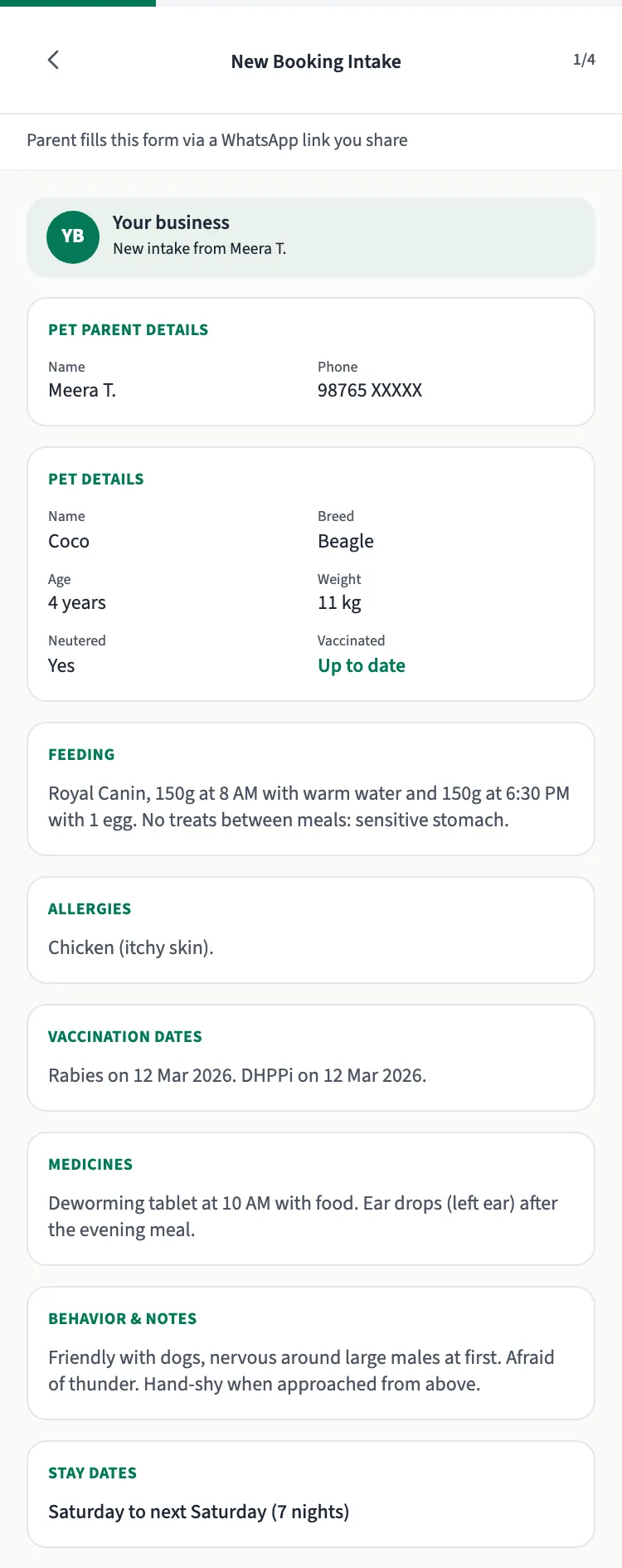 From petboard's demo account: a client's answers as they arrive through petboard's own intake form, which can take over the job your Google Form did.
What if my list is on WhatsApp and in a notebook?
petboard does not read WhatsApp chats or chat exports. It cannot read a photo of a notebook page either. There are two honest ways forward.
Type the clients you still see into a sheet. Use the same columns as the example above. Start with the clients who book often. You do not need every old contact. Then upload the sheet the same way.
Or start fresh. Send your enquiry link to each client when they next message you. The client gives their name and phone number, and they come to your Clients list. Your list then builds up as clients book.
You can also do both: type your regular clients today, and send the link to everyone else.
What happens to duplicates, phone numbers and empty cells?
Phone numbers. petboard accepts an Indian mobile number: 10 digits that start with 6, 7, 8 or 9. It can have 0, 91 or +91 in front, and spaces, dashes or brackets inside. So "+91 98XXX XXX01" and "098XXXXXX01" are read as the same number. If a cell has 2 numbers, petboard uses the first one. A landline or a number from outside India is not imported, and the row is listed as "Not an Indian mobile number".
Duplicates. Rows with the same phone number become 1 client. If the same phone number and the same pet name appear twice, the second row is not imported. If a client is already in petboard with that number, petboard adds their new pets to them. A pet they already have with the same name is not added again, and details you already saved are not changed. If you upload the same file again, pets from the earlier upload are not changed.
Missing data. A row with no phone number or no pet name is not imported. An empty cell in any other column just stays empty. Some values are left empty: a date petboard cannot read, a vaccine date in the future, or a weight it cannot read. Before you import, petboard shows how many rows cannot come over and how many values it will leave empty, with the reason for each.
When petboard stops. If more than 1 in 10 rows cannot come over, or more than 1 in 20 rows have no phone number petboard can use, petboard stops before importing anything. Nothing is added. You can fix the rows and upload the file again, or tap Import it for me.
What comes over, and what does not?
| Comes over | Does not come over |
|---|---|
| Client name, phone, email, address | Past bookings and stays |
| Emergency contact name and phone | Payments, balances and any money column |
| Pet name, kind (dog or cat), breed, gender, birthday, weight, neutered or spayed, behaviour | Photos |
| Allergies, medicines, illness history, food | ID numbers, such as Aadhaar |
| Rabies, DHPPiL and kennel cough vaccine dates, deworming and tick treatment dates | "I agree" answers |
| Vet name and phone | Second phone number, microchip number, tags |
If your file has a column petboard cannot keep, the match screen says so next to that column.
What do you sign before you upload?
Before the upload, you sign a short data-import attestation in petboard. You read it to the end and tick a box. It is a signed record tied to your account and to that file. In it, you confirm that:
- you are the Data Fiduciary for the records, and petboard is your Data Processor;
- you collected the data lawfully, with the client's consent or for your existing care relationship with them;
- the file has no care photos or videos, WhatsApp chat archives, free-text medical narratives, ID document scans or payment card data.
Why this matters: India's Digital Personal Data Protection Act, 2023 defines a Data Fiduciary as the person who "determines the purpose and means of processing of personal data". It defines a Data Processor as one who "processes personal data on behalf of a Data Fiduciary". Section 8(1) says the Data Fiduciary is responsible for complying with the Act for processing done "on its behalf by a Data Processor". Section 3 says the Act also covers data collected on paper and "digitised subsequently", so a notebook you type into a sheet is covered too (the Act as published in the Gazette, checked 18 October 2026). Parliament passed this Act in 2023. Most of its duties start in May 2027, so following them now is good practice. This is a summary, not legal advice.
Your file stays inside petboard's systems. It is deleted 90 days after you upload it.
Upload your file
- Sign up for petboard. Your first booking is free, and you need no card.
- Open Import your clients. Links to it are in your setup steps, on the empty Clients page ("Import your client list") and in Settings ("Import my data").
- Sign the data-import attestation and upload your .xlsx or CSV file.
- Match the columns, check 5 rows, and import.
Would you rather not do the matching? Tap Import it for me on any step of the import. We already have your file, and we import it within one working day. It is free. Please do not email your file. Upload it in petboard, so it stays covered by the attestation you signed.
Two cases always go to us: an account with more than one brand, and a team member's login instead of the owner's. There, the page takes a CSV file and we import it for you within one working day.
For a longer walkthrough of switching, see how migration to petboard works.